Important documents can easily become scattered around the home. Bills, receipts, warranties, insurance papers, tax records, rental documents, personal IDs, and household papers often end up in drawers, bags, boxes, or random folders.
The problem is not usually the amount of paper. The real problem is not having a simple system for deciding what to keep, where to store it, and how to find it later.
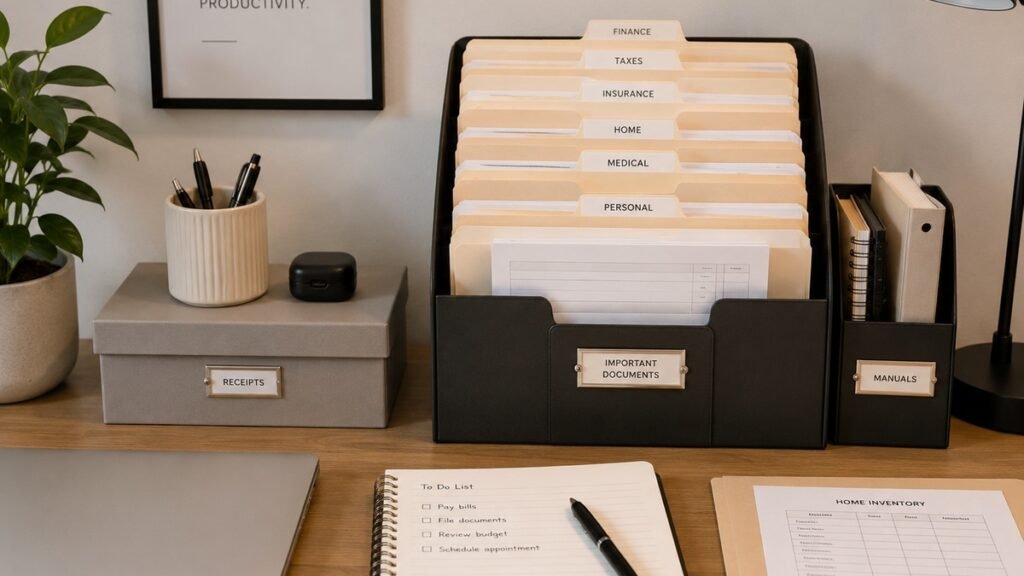
This guide will show you how to organize important documents at home using a simple, beginner-friendly system that is easy to maintain.
1. Gather Your Documents in One Place
The first step is to collect your documents from around the house. Look in drawers, desks, bags, kitchen counters, shelves, closets, file boxes, and anywhere else papers tend to collect.
Common places to check include:
- Desk drawers
- Kitchen counters
- Entryway tables
- Nightstands
- Storage boxes
- Closets
- Bags and backpacks
- Old folders
- Mail piles
Place everything in one open area, such as a table or clean floor space. This may look messy at first, but it helps you see what you actually have.
If your desk is also full of papers, you may want to review our guide on how to organize a small desk so your workspace does not become permanent paper storage.
2. Sort Papers Into Simple Categories
Once your papers are gathered, sort them into broad categories. Do not worry about making the system perfect. Start with simple groups that are easy to understand.
Useful document categories include:
- Personal identification
- Home or rental documents
- Vehicle documents
- Insurance documents
- Medical records
- Tax-related documents
- Banking and financial records
- Receipts
- Warranties and manuals
- School or work documents
- Pet records
- Miscellaneous papers
Use sticky notes, temporary folders, or labeled piles while sorting. The goal is to separate papers into groups before deciding what to keep or remove.
This guide is for general home organization only. For legal, tax, medical, or financial record requirements, always follow official guidance or consult a qualified professional.
3. Create Three Main Action Piles
After sorting by category, create three main action piles. This makes the process easier and prevents every paper from feeling like a separate decision.
Use these three piles:
- Keep
- Review
- Shred or recycle
The keep pile is for documents you know you need to store. The review pile is for papers you are unsure about. The shred or recycle pile is for documents you no longer need.
Be careful with papers that contain personal information. Anything with account numbers, identification numbers, medical details, signatures, or other private details should be handled securely.
If you are unsure whether to keep a document, place it in the review pile instead of throwing it away immediately.
4. Decide What Needs to Be Easy to Access
Not every important document needs to be stored in the same place. Some papers should be easy to access, while others can be archived.
Documents you may need quick access to include:
- Current lease or mortgage papers
- Current insurance documents
- Recent bills
- Active warranties
- Current school or work forms
- Frequently used IDs or copies
- Emergency contact information
Older documents, expired warranties, past records, and reference papers may not need to be close to your desk or kitchen counter.
A good document system separates active papers from archived papers. This keeps your daily space cleaner and makes important items easier to find.
5. Choose a Simple Storage Method
Your document storage system does not need to be expensive. The best system is the one you can use consistently.
Common document storage options include:
- File box
- Filing cabinet
- Accordion folder
- Binder with dividers
- Document wallet
- Plastic file folders
- Portable file case
If you have only a small number of papers, an accordion folder may be enough. If you have many household records, a file box or filing cabinet may work better.
For small homes or apartments, choose a system that fits on a shelf, inside a closet, or under a desk without taking over the room.
If you are still setting up your home workspace, our small home office setup checklist can help you plan storage for papers, supplies, and digital tools.
6. Use Clear Folder Labels
Clear labels make your document system easier to use. Avoid vague labels such as “stuff,” “misc,” or “important.” These labels may feel convenient at first, but they make papers harder to find later.
Better folder label examples include:
- Personal IDs
- Home Documents
- Rental Agreement
- Insurance
- Medical Records
- Tax Documents
- Receipts
- Warranties
- Vehicle Documents
- Pet Records
- School Documents
If you have many papers, you can create subfolders. For example, “Insurance” can include home insurance, car insurance, health insurance, and pet insurance.
Keep labels simple enough that another person in your household could understand the system if needed.
7. Separate Active Papers From Long-Term Storage
One common mistake is storing every document together. This can make it harder to find the papers you actually need.
Create two basic zones:
- Active documents
- Long-term documents
Active documents are papers you are currently using or may need soon. Long-term documents are papers you need to keep but do not access often.
Active documents may go in a desk folder, tray, or small file holder. Long-term documents can go in a file box, cabinet, or storage area.
This keeps daily paperwork from mixing with older records.
8. Create a Simple Receipt System
Receipts can create a lot of clutter because they are small, easy to lose, and often kept without a clear reason.
Start by sorting receipts into groups:
- Receipts to keep temporarily
- Receipts for returns
- Receipts for warranties
- Receipts for tax or business purposes
- Receipts you no longer need
Use one folder, envelope, or small box for current receipts. Review it regularly so old receipts do not pile up.
For purchases connected to warranties, keep the receipt with the warranty or product manual. This makes it easier to find everything together later.
For tax, business, or financial records, follow official guidance or ask a qualified professional if you are unsure what to keep.
9. Organize Warranties and Manuals
Warranties and manuals are useful only if you can find them when something breaks or needs maintenance.
Use one folder or box for product-related documents. You can organize them by category, such as:
- Kitchen appliances
- Electronics
- Furniture
- Home office equipment
- Tools
- Large household items
For each product, keep important papers together when possible. This may include the manual, warranty information, receipt, and model number.
If a manual is available online and you do not need the paper copy, you may choose to save a digital version instead.
10. Store Sensitive Documents Carefully
Some documents contain sensitive personal information and should be stored more carefully than everyday papers.
Sensitive documents may include:
- Passports
- Birth certificates
- Social security or national identification documents
- Medical records
- Insurance papers
- Legal documents
- Banking documents
- Tax records
Choose a storage location that is private, dry, and protected from everyday damage. Depending on your needs, you may want a lockable file box, safe, or another secure storage option.
Do not leave sensitive documents in open piles, shared spaces, or places where they may be lost or damaged.
This section is for general organization only. For high-value, legal, or identity-related documents, consider professional guidance or official recommendations.
11. Make Digital Copies When Useful
Digital copies can make documents easier to access and back up. However, digital copies should be organized carefully so they do not become another source of clutter.
You may want digital copies of:
- Important receipts
- Warranty information
- Household records
- Rental or home documents
- Insurance documents
- School or work forms
Use clear file names when saving scanned documents. For example:
- Home-Insurance-Policy-2026.pdf
- Laptop-Receipt-2026.pdf
- Apartment-Lease-2026.pdf
- Car-Insurance-May-2026.pdf
Store digital copies in organized folders, not randomly on your desktop or downloads folder.
If your digital files are messy, start with our digital declutter checklist for beginners.
12. Use a Simple Naming System for Digital Documents
A clear naming system helps you find digital documents faster. You do not need a complicated format. You only need names that make sense later.
A simple file name can include:
- Document type
- Company or category
- Date or year
Examples:
- Electric-Bill-April-2026.pdf
- Health-Insurance-Card-2026.pdf
- Desk-Warranty-2026.pdf
- Tax-Document-2026.pdf
- Pet-Vaccine-Record-2026.pdf
Use the same style consistently so your files are easier to scan and search.
If you use Google Drive for personal files, our guide on how to organize Google Drive for personal use can help you build a cleaner digital folder system.
13. Create an Incoming Paper Station
New papers will keep coming into your home, so your system needs a place for incoming documents. Without an incoming paper station, papers may return to counters, desks, and random drawers.
Your incoming paper station can be simple. It may be:
- A small tray
- A folder near your desk
- A basket near the entryway
- A wall pocket
- A file holder
Use this place only for new papers that still need a decision. Do not let it become permanent storage.
Once or twice a week, review the incoming papers and move them to the right place.
14. Review Documents Regularly
A document system works best when it is reviewed regularly. If you never review it, old receipts, expired warranties, outdated forms, and unnecessary papers can pile up again.
A simple review schedule may include:
- Weekly review for incoming papers
- Monthly review for receipts and active documents
- Seasonal review for household records
- Annual review for long-term files
You do not need to review everything every week. The goal is to prevent paper clutter from becoming overwhelming.
You can add document review to a larger weekly reset routine for your home, desk, and digital life.
15. Know When to Shred, Recycle, or Keep
Not every paper should be kept forever. Some papers can be recycled, while others should be shredded because they contain private information.
Recycle papers that do not contain sensitive information and are no longer needed, such as:
- Old envelopes
- Flyers
- Blank inserts
- Expired coupons
- Non-sensitive notes
Shred or securely destroy papers that contain personal information, such as:
- Account numbers
- Identification numbers
- Medical information
- Financial details
- Signatures
- Private addresses or contact details
Keep documents that are current, important, or required for your personal, household, legal, tax, or financial needs.
Because record-keeping rules can vary by location and situation, use official guidance or professional advice when you are unsure.
16. Important Documents Checklist
Use this checklist to organize your important documents at home.
Personal Documents
- Passports
- Birth certificates
- Identification cards
- Social security or national identification documents
- Marriage or family documents if applicable
Home Documents
- Lease or mortgage papers
- Home insurance documents
- Utility account information
- Maintenance records
- Home improvement receipts
Vehicle Documents
- Vehicle registration
- Car insurance documents
- Maintenance records
- Repair receipts
- Warranty documents
Financial Documents
- Banking documents
- Tax-related papers
- Important receipts
- Loan documents
- Account information
Medical and Insurance Documents
- Health insurance cards
- Medical records
- Prescription information if needed
- Dental or vision documents
- Insurance policy documents
Product Documents
- Warranties
- Product manuals
- Purchase receipts
- Serial numbers
- Repair information
Digital Copies
- Scan important documents when useful
- Use clear file names
- Store digital copies in organized folders
- Back up important files
- Protect sensitive files carefully
Common Document Organization Mistakes
Organizing important documents is easier when you avoid a few common mistakes.
Keeping every paper forever
Keeping too much paper can make important documents harder to find. Keep what matters and remove what you no longer need.
Using vague folder labels
Labels like “important” or “miscellaneous” can become confusing. Use specific labels that clearly describe what is inside.
Mixing active and archived documents
Current papers should be easier to access than older records. Keep active documents separate from long-term storage.
Forgetting digital organization
Scanned documents are helpful only if they are named clearly and stored in the right folders.
Leaving sensitive papers in open spaces
Documents with private information should not sit in open piles where they can be lost, damaged, or seen by others.
Never reviewing the system
Even a good document system needs maintenance. Review papers regularly so clutter does not build up again.
Final Thoughts
Organizing important documents at home does not need to be complicated. Start by gathering your papers, sorting them into simple categories, and deciding what to keep, review, shred, or recycle.
Choose a storage method that fits your home, use clear labels, separate active papers from long-term records, and create a simple routine for incoming documents.
The goal is not to create a perfect filing system. The goal is to make your important documents easier to find, easier to protect, and easier to manage over time.