Setting up a small home office does not have to be complicated or expensive. You do not need a large room, designer furniture, or a perfect desk setup to create a workspace that helps you focus.
A good home office is simply a space that feels comfortable, supports your daily work, and keeps the things you need within easy reach.
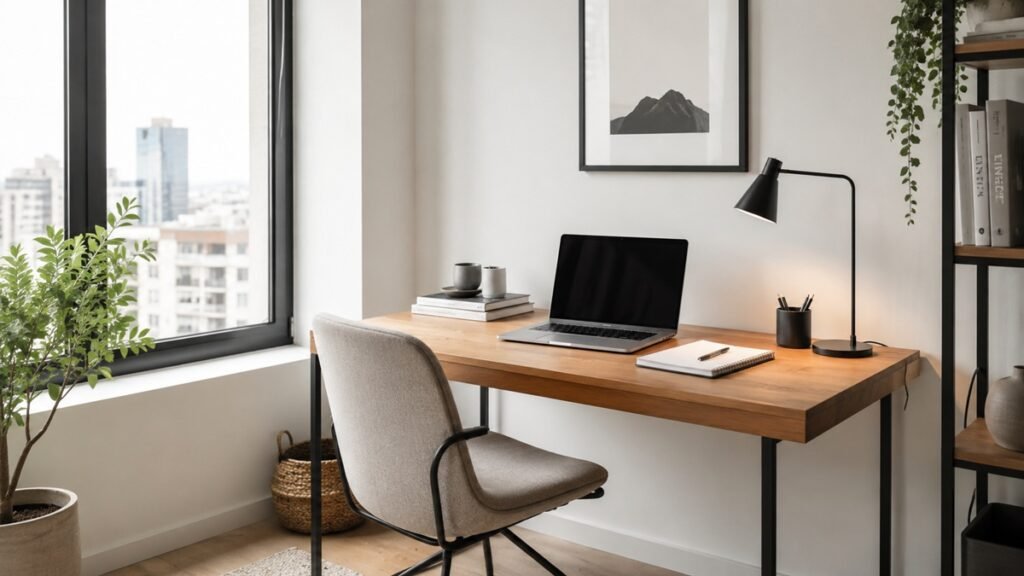
Whether you work from home full-time, study online, run a small business, or just need a quiet place for personal tasks, this beginner-friendly checklist will help you build a practical home office from the ground up.
1. Choose the Right Spot
The first step is choosing where your home office will be. You do not need a separate room. A corner of your bedroom, living room, hallway, or dining area can work if it is quiet enough and easy to use.
Look for a space that has:
- Enough room for a desk or small table
- Access to a power outlet
- Good lighting
- A chair that can fit comfortably
- Less foot traffic during your working hours
Try to avoid setting up your workspace in a place where you will need to move everything every day. A consistent workspace makes it easier to start working and stay organized.
If you live in a small apartment, choose a spot that can stay simple and clutter-free. Even a small desk against a wall can become a useful home office when it is planned well.
2. Pick a Desk That Fits Your Space
Your desk does not need to be large. In fact, a smaller desk can help you stay more focused because it limits clutter.
Before buying a desk, measure the area where you want to place it. Make sure there is enough space for your chair, legs, laptop or monitor, and basic supplies.
Good desk options for small spaces include:
- Compact writing desk
- Wall-mounted desk
- Folding desk
- Corner desk
- Narrow console table
- Small dining table used as a workspace
The best desk is one that fits your space and supports the type of work you do. If you mostly use a laptop, a small desk may be enough. If you use a monitor, keyboard, notebook, and documents, you may need a slightly deeper surface.
For more practical ideas, see our guide on how to organize a small desk without making it feel crowded.
3. Use a Comfortable Chair
A comfortable chair is one of the most important parts of a home office. You may be able to work at almost any table, but sitting in an uncomfortable chair for long periods can make it harder to focus.
Look for a chair that allows you to sit with your feet flat on the floor and your back supported.
A good home office chair should have:
- Stable support
- Comfortable seat height
- Back support
- Enough room to move
- A size that fits your desk
You do not always need an expensive office chair. If you are using a dining chair, you can improve comfort with a seat cushion or small back pillow.
The goal is to create a sitting position that feels natural and does not distract you while working.
4. Set Up Good Lighting
Lighting can make a big difference in how your workspace feels. A dark or poorly lit desk can make your space feel tiring, while good lighting can make it easier to read, write, and focus.
Natural light is helpful, but it should not create glare on your screen. If possible, place your desk near a window but not directly facing strong sunlight.
For evening work or darker rooms, use a desk lamp. A simple lamp with adjustable brightness is often enough.
Try to include:
- Natural light when available
- A desk lamp for focused work
- Soft room lighting to reduce eye strain
- A screen position that avoids glare
Good lighting does not need to be complicated. The main goal is to make your workspace bright enough without making it uncomfortable.
5. Keep Your Desk Surface Simple
A beginner home office works best when the desk surface is clean and easy to use. Too many items on the desk can make the space feel messy and distracting.
Start with only the essentials:
- Laptop or monitor
- Keyboard and mouse if needed
- Notebook or planner
- Pen
- Desk lamp
- Water bottle
- One small tray or container for daily items
Avoid keeping unrelated items on your desk. If something does not help you work, write, plan, or focus, it probably belongs somewhere else.
A simple desk is easier to clean, easier to reset, and easier to use every day.
6. Manage Cables Early
Cable clutter can quickly make a home office look messy. It is easier to manage cables when you set up your workspace instead of waiting until everything becomes tangled.
Start by identifying which cables you use every day. These may include your laptop charger, monitor cable, phone charger, lamp cable, and extension cord.
Simple cable management ideas include:
- Use cable clips to guide cords along the desk
- Use cable ties to group extra cable length
- Keep power strips off the floor if possible
- Label similar-looking cables
- Unplug and remove cables you no longer use
You do not need a perfect cable setup. The goal is to keep cables safe, easy to reach, and less distracting.
For a cleaner setup, you can follow our cable management ideas for home office desks.
7. Add Basic Storage
A small home office needs storage, but not too much. The more storage you add, the easier it is to collect things you do not really need.
Start with simple storage that matches your actual work habits.
Useful storage options include:
- Small drawer unit
- Desktop organizer
- File box
- Wall shelf
- Rolling cart
- Storage basket
- Document folder
Keep frequently used items close to your desk. Store less-used items farther away.
For example, pens, chargers, and notebooks can stay near your desk. Old documents, extra supplies, and backup items can go in a cabinet, closet, or storage box.
8. Create a Paper System
Paper clutter is one of the fastest ways to make a home office feel messy. Even if most of your work is digital, you may still have bills, notes, receipts, forms, or printed documents.
Create a simple paper system with three categories:
- Action: papers you need to do something with
- File: papers you need to keep
- Recycle: papers you no longer need
Use a small tray, folder, or file box to separate these categories.
Do not let paper sit on your desk without a decision. At the end of the week, review your paper pile and either act on it, file it, or remove it.
For bills, receipts, and personal records, you can also use our guide on how to organize important documents at home.
9. Prepare Your Digital Workspace
A home office is not only physical. Your digital workspace matters too.
Before you start working regularly from your home office, organize your main digital tools. This can make your daily routine smoother and reduce wasted time.
Basic digital setup checklist:
- Create a simple folder system
- Clean up your desktop
- Bookmark important websites
- Organize your email inbox
- Set up cloud storage if needed
- Check your video call app
- Test your microphone and camera
- Save important passwords securely
If your computer feels just as cluttered as your desk, start with our digital declutter checklist for beginners.
You do not need to organize your entire digital life in one day. Start with the tools you use most often.
10. Keep Daily Supplies Within Reach
Your workspace should make it easy to start working. If you constantly need to get up to find a charger, notebook, pen, or document, your setup may need adjustment.
Keep your daily supplies nearby, such as:
- Laptop charger
- Phone charger
- Pens
- Notebook
- Headphones
- Sticky notes
- Important documents
- Water bottle
- Tissues
However, avoid keeping too many backup supplies on your desk. One or two pens are useful. Twenty pens can become clutter.
11. Make the Space Comfortable but Not Distracting
A home office should feel pleasant, but it should still be a place for focus.
You can add a few personal touches, such as:
- A small plant
- A simple framed print
- A comfortable cushion
- A desk mat
- A small clock
- A calming lamp
Try not to overdecorate your workspace in the beginning. Start simple, then add items only if they make the space more comfortable or useful.
A good rule is this: if an item makes it easier to work, keep it. If it distracts you or collects dust, move it somewhere else.
12. Set Up a Weekly Reset Routine
Even a well-designed home office can become messy after a few busy days. A weekly reset helps keep your workspace usable.
Choose one day each week to reset your desk. This can take 10 to 15 minutes.
Weekly home office reset checklist:
- Clear trash
- Return items to their place
- Wipe the desk surface
- Organize loose papers
- Check cables
- Refill basic supplies
- Clear your computer desktop
- Review your task list
- Prepare your desk for the next week
The goal is not perfection. The goal is to make your workspace ready to use again.
13. Avoid Buying Too Much at the Beginning
It is easy to think you need a lot of products to create a good home office. But buying too much too early can create clutter and waste money.
Start with the basics:
- Desk or table
- Chair
- Lighting
- Power access
- Computer or laptop
- Basic storage
- A simple paper system
After using your workspace for a few weeks, you will understand what you actually need.
Maybe you need better lighting. Maybe you need more storage. Maybe you need a monitor stand. It is better to buy based on real needs instead of guessing.
14. Beginner Home Office Setup Checklist
Here is a simple checklist you can use when setting up your first home office.
Space
- Choose a quiet or low-traffic area
- Make sure there is enough room for a desk and chair
- Check access to power outlets
- Avoid strong screen glare
- Keep the space easy to reset
Furniture
- Choose a desk that fits your space
- Use a comfortable chair
- Add a footrest if needed
- Keep enough leg room under the desk
- Avoid oversized furniture in small rooms
Lighting
- Use natural light when possible
- Add a desk lamp
- Avoid glare on your screen
- Use soft room lighting for evening work
Desk Setup
- Keep only daily essentials on the desk
- Use a notebook or planner
- Keep pens in one place
- Use a tray for small items
- Remove unrelated clutter
Cables
- Group similar cables
- Use cable clips or ties
- Keep chargers easy to reach
- Remove unused cords
- Keep power strips safe and accessible
Storage
- Add a small drawer, shelf, or cart
- Use folders for documents
- Keep daily items nearby
- Store backup supplies away from the desk
- Review storage regularly
Digital Setup
- Clean up your desktop
- Organize files into folders
- Bookmark important websites
- Set up email folders
- Test video call tools
- Back up important files
Weekly Reset
- Clear trash
- Sort papers
- Wipe the desk
- Put items back
- Check supplies
- Prepare for the next week
Common Home Office Setup Mistakes
When setting up a home office for the first time, avoid these common mistakes.
Buying before planning
Measure your space and understand your needs before buying furniture or storage.
Choosing style over comfort
A beautiful chair or desk is not useful if it is uncomfortable or impractical.
Keeping too much on the desk
A cluttered desk can make it harder to focus. Keep only what you use often.
Ignoring cable clutter
Messy cables can make your workspace feel unfinished and harder to clean.
Not creating a paper system
Loose papers can pile up quickly. Use a simple system from the beginning.
Forgetting digital organization
Your computer, email, and cloud storage are part of your workspace too.
A good next step is learning how to organize Google Drive for personal use so your files are easier to find.
Final Thoughts
A good home office does not need to be perfect. It only needs to support the way you work.
Start with a clear space, a comfortable chair, a practical desk, good lighting, and a simple organization system. Then improve your setup slowly as you learn what works best for you.
The best home office is not the most expensive one. It is the one that helps you sit down, focus, and get things done with less stress.