A weekly reset routine can help you start the week with a cleaner home, clearer desk, and more organized digital life. It does not need to be complicated, strict, or time-consuming.
The goal of a weekly reset is simple: clear small messes before they become overwhelming, prepare your space for the next few days, and make everyday tasks easier to manage.
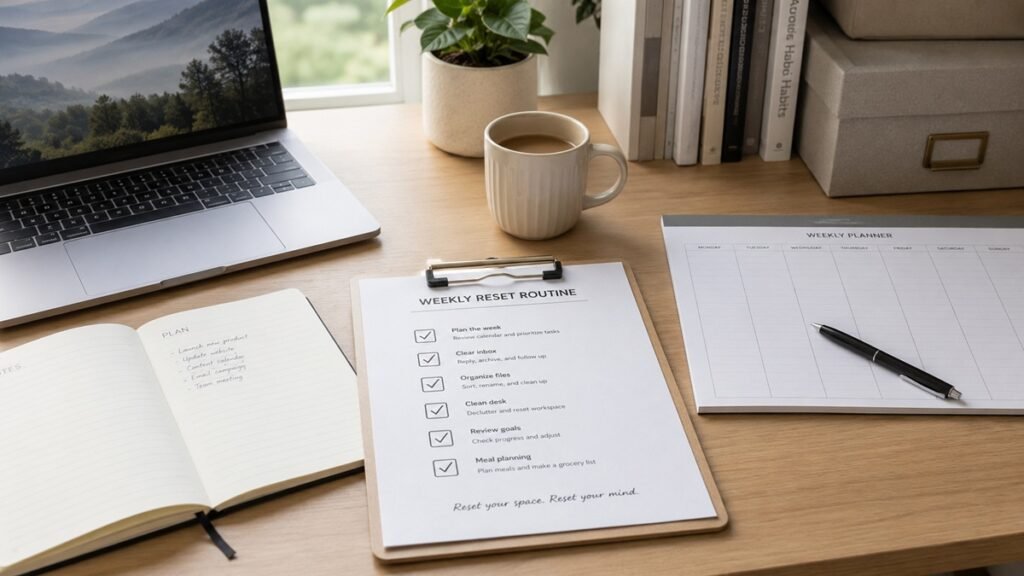
This guide will show you how to create a simple weekly reset routine for your home, desk, paperwork, inbox, files, and digital tools.
1. Choose a Weekly Reset Day
The first step is choosing when your weekly reset will happen. Many people prefer Sunday because it helps them prepare for the new week, but you can choose any day that fits your schedule.
Good weekly reset times include:
- Sunday afternoon
- Sunday evening
- Monday morning
- Friday afternoon
- Saturday morning
- Any quiet time before your week gets busy
Choose a time that feels realistic. A weekly reset should support your life, not become another stressful task.
If you are just starting, keep the routine short. Even 20 to 30 minutes can make a noticeable difference.
2. Start With a Quick Home Reset
A simple home reset helps your space feel easier to use. You do not need to deep clean your entire home every week. Focus on visible clutter and small tasks that make the biggest difference.
Start with common areas such as:
- Kitchen counter
- Dining table
- Living room
- Entryway
- Bedroom surfaces
- Desk or workspace
Use a simple process: throw away trash, return items to their place, and clear surfaces that collect clutter.
This is not a full cleaning session. It is a reset that helps your home feel usable again.
3. Clear Your Desk or Workspace
Your desk is one of the most important places to reset each week, especially if you work, study, plan, or manage personal tasks from home.
A weekly desk reset may include:
- Throwing away trash
- Putting pens and supplies back
- Removing cups or dishes
- Sorting loose papers
- Wiping the desk surface
- Checking your notebook or planner
- Clearing the main working area
If your workspace still feels difficult to use, our small home office setup checklist can help you improve your overall setup.
For smaller workspaces, you can also use our guide on how to organize a small desk.
4. Reset Cables and Chargers
Cables can slowly become messy during the week. Chargers move around, cords fall behind the desk, and extra cables appear where they do not belong.
During your weekly reset, take a minute to:
- Return chargers to their usual place
- Remove cables you do not need
- Untangle visible cords
- Check that your laptop charger is easy to reach
- Move backup cables away from your desk
- Keep your charging area simple
This small step can make your desk look cleaner and make your devices easier to use.
If cords are a regular problem, see our cable management ideas for home office desks.
5. Sort Loose Papers
Paper clutter often builds up slowly. Receipts, notes, mail, printed forms, and random documents can spread across your desk, kitchen counter, or entryway.
Use three simple categories during your weekly reset:
- Action
- File
- Recycle or shred
Action papers need your attention. File papers should be saved. Recycle or shred papers are no longer needed.
Try not to let papers sit in the same pile week after week. If a paper needs action, write down the next step or put it somewhere you will actually review it.
For a more complete system, use our guide on how to organize important documents at home.
6. Review Your Calendar
A weekly reset is a good time to look at your calendar. This helps you understand what is coming and prepare for appointments, tasks, deadlines, or personal plans.
Check for:
- Appointments
- Meetings
- Important deadlines
- Errands
- Family plans
- Bill due dates
- Personal reminders
You do not need to plan every minute of your week. Just notice anything that may require preparation.
If something important is coming, write down the next action so it does not stay only in your head.
7. Choose Your Main Priorities for the Week
A weekly reset is not only about cleaning. It is also a chance to choose what matters most for the next few days.
Pick a small number of priorities, such as:
- One work priority
- One home priority
- One personal priority
- One admin task
- One small habit to maintain
Keep the list short. Too many priorities can make the week feel overwhelming before it even begins.
A good weekly reset should make your week feel clearer, not heavier.
8. Clean Up Your Computer Desktop
Your digital workspace can become just as cluttered as your physical desk. Screenshots, downloads, documents, and temporary files often pile up on the computer desktop.
During your weekly reset, take a few minutes to:
- Delete files you no longer need
- Move documents to the right folders
- Remove old screenshots
- Close unused windows
- Keep only useful shortcuts visible
A cleaner digital desktop can make your computer feel easier to use.
If your computer, inbox, and files need a bigger reset, start with our digital declutter checklist for beginners.
9. Review Your Downloads Folder
The Downloads folder often collects files you only needed once. Over time, it can become full of old PDFs, images, installers, documents, and duplicate files.
Use your weekly reset to check recent downloads.
Ask:
- Do I still need this file?
- Should this be moved to a folder?
- Can this be deleted?
- Is this a duplicate?
- Does this file need a clearer name?
You do not need to empty the folder completely every week. Just prevent it from becoming a permanent storage area.
10. Clean Up Your Gmail Inbox
Email can become overwhelming if it is never reset. A weekly Gmail cleanup can help you notice important messages and remove clutter before it grows.
A simple Gmail reset may include:
- Delete obvious junk
- Archive completed conversations
- Review starred emails
- Unsubscribe from unwanted newsletters
- Check important labels
- Save important attachments
- Clear old promotions
You do not need to reach inbox zero. The goal is to make your inbox easier to use.
For a detailed email routine, follow our guide on how to clean up your Gmail inbox.
11. Organize Recent Google Drive Files
If you use Google Drive, your weekly reset is a good time to organize recent uploads, new documents, and temporary files.
Check your recent files and ask:
- Does this file have a clear name?
- Is it in the right folder?
- Is it a duplicate?
- Should it be archived?
- Is it still needed?
Move important files into the correct folders and delete obvious clutter.
If your Drive is messy, our guide on how to organize Google Drive for personal use can help you build a simple folder system.
12. Reset Your Phone Home Screen
Your phone can also collect clutter. Apps, screenshots, notifications, and unread badges can make your phone feel distracting.
A weekly phone reset may include:
- Delete unnecessary screenshots
- Remove apps you no longer use
- Move distracting apps away from the main screen
- Clear old notifications
- Review unread messages
- Update apps if needed
You do not need a minimalist phone setup. Just make your phone easier to use and less distracting.
13. Prepare Your Work Bag or Daily Items
If you leave the house for work, school, errands, or appointments, use your weekly reset to prepare the items you often need.
You may want to check:
- Wallet
- Keys
- Chargers
- Notebook
- Reusable water bottle
- Important documents
- Work or school items
- Items for upcoming appointments
This helps reduce last-minute searching during the week.
If you mostly work from home, use this step to prepare your desk supplies instead.
14. Do a Simple Supply Check
A quick supply check can prevent small problems during the week. You do not need to create a detailed inventory. Just notice what is running low.
Check items such as:
- Printer paper
- Pens
- Sticky notes
- Cleaning supplies
- Kitchen basics
- Toiletries
- Batteries
- Pet supplies if needed
Add missing items to a shopping list instead of relying on memory.
This small habit can make your home feel easier to manage.
15. Keep the Routine Realistic
A weekly reset should not become a long, exhausting routine. If it is too complicated, you may avoid doing it.
Start with the most useful parts:
- Clear your desk
- Sort papers
- Review your calendar
- Clean up your inbox
- Organize recent files
You can always add more steps later. It is better to have a short routine you actually repeat than a perfect routine you rarely do.
16. Weekly Reset Routine Checklist
Use this checklist as a simple guide for your weekly reset.
Home Reset
- Clear visible clutter
- Return items to their place
- Throw away trash
- Reset kitchen counters
- Clear entryway items
- Prepare basic supplies for the week
Desk Reset
- Clear the desk surface
- Put supplies back
- Remove cups or dishes
- Sort loose papers
- Wipe the desk
- Reset chargers and cables
Paper Reset
- Collect loose papers
- Sort papers into action, file, and recycle
- File important documents
- Shred sensitive papers if needed
- Review receipts
- Clear old notes
Calendar Reset
- Review appointments
- Check deadlines
- Notice errands
- Prepare for upcoming tasks
- Choose weekly priorities
Digital Reset
- Clean your computer desktop
- Review Downloads folder
- Delete unnecessary screenshots
- Move files to the right folders
- Organize recent Google Drive files
- Back up important files if needed
Email Reset
- Delete obvious junk
- Archive completed emails
- Review starred emails
- Unsubscribe from unwanted newsletters
- Check important labels
- Save important attachments
Phone Reset
- Clear old notifications
- Delete unnecessary screenshots
- Remove unused apps
- Move distracting apps away from the main screen
- Check important reminders
Common Weekly Reset Mistakes
A weekly reset should make life easier. Try to avoid these common mistakes.
Trying to do too much
If your routine is too long, it may become difficult to repeat. Start with a few high-impact tasks.
Turning it into a deep cleaning session
A weekly reset is not the same as deep cleaning. Focus on restoring order, not making everything perfect.
Skipping digital clutter
Your inbox, desktop, and cloud storage are part of your everyday system. Resetting only your physical space may not be enough.
Not reviewing your calendar
A clean space is helpful, but knowing what is coming during the week is just as important.
Using the routine only when things are messy
A weekly reset works best as a habit. It prevents clutter instead of only reacting to it.
Expecting perfection
Some weeks will be busy. A short reset is still better than doing nothing.
Final Thoughts
A weekly reset routine is a simple way to keep your home, desk, documents, email, and digital files easier to manage. It does not need to be perfect, long, or complicated.
Start with the areas that affect your daily life the most. Clear your desk, sort loose papers, review your calendar, clean up your inbox, and organize recent files.
Over time, a small weekly reset can help your home and digital life feel calmer, clearer, and easier to use.